t

Webcam Photo Booth Software

Plug in a webcam, open Sparkbooth, and you have a booth.

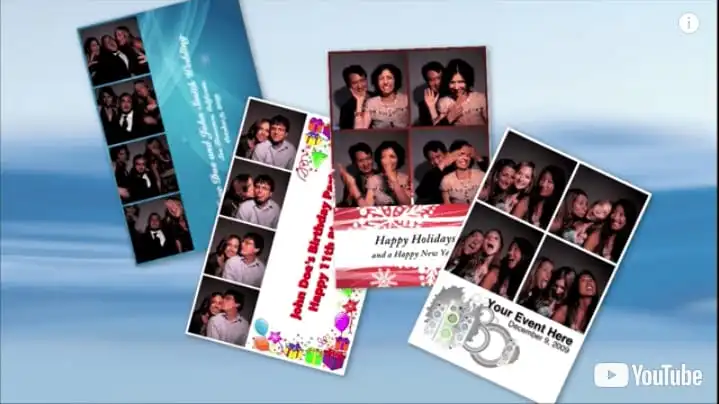
Sparkbooth 7 runs on any webcam, or on the camera already built into your laptop. Pick a layout, add your props and backdrop, and guests get the full experience — countdown, live preview, printed strips, green screen, mirror and GIF modes, and photos delivered by email, text or QR code — from a computer and one cable.

Click to play the Sparkbooth demo video

Free 30-day no obligation trial. Photos are watermarked during trial.

Any Webcam Works

There is no approved camera list to check against. If Windows or macOS can see the webcam, Sparkbooth can shoot with it — the camera you have on hand is enough to build and test a booth tonight, and you can upgrade it later without changing anything else.

Built-In or USB

Laptop cameras and any standard webcam appear in Sparkbooth's camera list as soon as they are connected. There are no drivers to install and no capture card in the middle.

720p to 4K

Every resolution the webcam reports shows up on the Size slider in the camera settings. Start where your camera is today and move the slider up when you buy a better one.

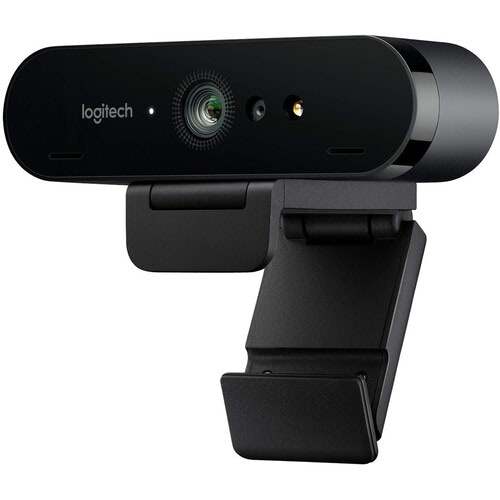
Our Pick: Logitech Brio

We run the Logitech Brio in our own booths for its 4K sensor, autofocus and adjustable field of view. See our recommended webcams for other options.

Sharper Prints with a 4K Webcam

Resolution decides how far a photo can be cropped and enlarged before it goes soft. A 1080p webcam captures about 2 megapixels, which is fine on a screen but leaves little headroom once a widescreen frame is trimmed into a portrait strip. A 4K webcam captures about 8 megapixels, so the same crop still lands comfortably above print resolution.

Sparkbooth 7 captures and previews at the webcam's full 4K resolution, and 4″ × 6″ prints from a 4K booth look noticeably cleaner than the 1080p output most webcam booths deliver. It is included with every Premium license, and turning it on is one slider.

Read the 4K photo booth guide

Logitech Brio 4K webcam used with Sparkbooth webcam photo booth software

Everything a Booth Needs

A webcam is only the front of the booth. Sparkbooth supplies the rest — the modes guests ask for, the layouts you brand, and the ways photos leave the event.

Mirror Booth Mode

Animated invitations, a countdown across the glass, signing and stickers for magic mirror hardware, plus AI photo transformations in any mode. See mirror booth mode.

GIF and Boomerang

Capture a burst and turn it into a looping GIF, a boomerang or a rewind clip with your own static or animated overlays. See GIF booth mode.

Green Screen

Green screen photo booth example

Hang a green backdrop and swap in any background image per layout — a beach, a ballroom or the sponsor's artwork — without leaving the venue.

Layout Editor

Build strips, 4″ × 6″ prints and custom keepsakes by dragging photo slots, logos and text into place. See the layout editor.

Sharing

Email, SMS and QR code sharing straight from the booth screen, or set up a separate photo kiosk where guests browse, share and print without holding up the line.

Printing

Print to any printer Windows or macOS can drive, from a dye-sub event printer to an inkjet at home. Strips, 4″ × 6″ prints and duplicate copies are all layout options.

Webcam or DSLR?

A webcam booth is the simplest kit you can carry: one USB cable, a small footprint and a camera that costs less than a single tripod. It is the right starting point for home parties, school events and a first rental business. Move to Sparkbooth DSLR when you need flash sync, shallow depth of field and clean photos in a dim reception hall. The layouts, modes and sharing are the same; the DSLR license adds Canon, Nikon and Sony camera support on top.

Premium
$149 USD
one-time purchase
  • Webcams, including 4K
  • Lifetime license, 3 activations
  • Commercial and business use
  • Free updates within version 7
  • Windows and macOS
Buy Premium
DSLR
$189 USD
one-time purchase
  • Everything in Premium
  • Canon, Nikon and Sony cameras
  • Lifetime license, 3 activations
  • Commercial and business use
  • Windows and macOS
Buy DSLR

Lifetime, non-expiring license — not a subscription. Not sure yet? Try the full app free for 30 days — no credit card, no obligation. Trial photos are watermarked. See the full feature comparison or upgrade an older license.

Webcam Photo Booth Questions

Which webcams work with Sparkbooth?

Any webcam, on Windows or macOS. If the camera shows up in the operating system, it shows up in Sparkbooth. Our recommended webcams page lists the models we have tested.

Do I need a special license for 4K?

No. 4K capture and preview are included with the Premium license at no extra charge. Connect a 4K webcam and raise the Size slider in the camera settings.

Can I use my laptop's built-in camera?

Yes, and it is a fine way to try the software. For an event, an external webcam gives you better framing, a higher resolution and a lens that can be positioned at face height instead of wherever the laptop lid happens to be, and it usually handles low light better.

Can I print from a webcam booth?

Yes. Sparkbooth prints to any printer installed on the computer, and layouts can be photo strips, 4″ × 6″ prints or your own custom size.

Can I use it for paid events?

Yes. Premium ($149 USD) and DSLR ($189 USD) are one-time licenses that include commercial and business use and 3 activations each, so you can run more than one booth from the same purchase. There is no subscription and no per-event fee.

Should I use a webcam or a DSLR?

Start with a webcam if you want the lowest cost and the simplest setup; a 4K webcam prints well and needs no camera settings at all. Choose Sparkbooth DSLR if you already own a Canon, Nikon or Sony camera, want strobe lighting, or shoot in dark venues — but expect to configure the camera yourself. A DSLR booth means setting aperture, shutter speed, ISO and focus for the room, and adjusting them when the light changes, so you should be comfortable doing that before an event rather than during one. Sony support is currently in beta.
Turn Your Webcam Into a Booth Today

Download the full application, point it at the webcam you already have, and run a complete session before you decide.

Free 30-day no obligation trial. Photos are watermarked during trial.

Using a Canon, Nikon or Sony camera? See Sparkbooth DSLR instead.